
When you are planning to build or redesign software, you will come across the term UI/UX quite early and frequently. What is meant by UI/UX in the context of software? UI, which stands for user interface, refers to all the things a person sees and interacts with on the screen. UX, standing for user experience, encompasses the general experience of using the software, covering how easy, fast, and clear it is to carry out a task. Together, these two factors affect whether people continue to use your product or give up on it.
The guide includes information on the definitions, the differences, the design process, the basic principles, common mistakes, how UI/UX can be measured, and the direction that software design is heading in the future
What Is UI/UX in Software?
The user interface includes all the visual and interactive aspects of a product such as layout, buttons, colours, typography, icons, forms, animations, and spacing.
The entire user journey is covered by UX, including user research, navigation logic, task flows, accessibility, error handling, and the way the user feels when using the product.
UI/UX is applicable to all types of software, such as web applications, mobile applications, SaaS dashboards, ERP and CRM systems, and e-commerce platforms. The term “user experience” was made widely known by Don Norman, who employed it as a job title when he was at Apple in the early 1990s.
UI/UX design is different from front-end development; the designers determine how the interface should look and behave and then create designs and prototypes, after which the developers implement them using code.
For example, when a website is being redesigned, a UI/UX team could find that users have difficulty locating important information since the navigation is not clear. The answer does not have to be to make the page more attractive; the team may instead have to reorganise the information architecture, simplify the navigation, redesign the key sections, and test the new structure before development starts.
At Prodzyn, this means design starts with understanding the problem rather than jumping straight into polished screens. Depending on the project, the process can include competitor analysis, UX research, empathy mapping, card sorting, information architecture, wireframing, visual design, prototyping, and testing.
Difference Between UI vs UX
| Aspect | UI | UX |
| Focus | Look and interaction | Overall experience and usability |
| Key question | How does it look and respond? | How does it work and feel? |
| Deliverables | Style guides, mockups, components, design systems | Research, user flows, wireframes, prototypes |
| Common tools | Figma, Sketch | Figma, Miro, Maze, usability testing tools |
| Example | Button color, typography, spacing | Reducing a checkout from seven steps to three |
The two depend on each other. Software with polished UI but poor UX can look good while making basic tasks frustrating. Software with good UX but weak UI can be functional but feel outdated or inconsistent.
Good software needs both.
Why UI/UX Matters in Software
Retention
Confusing software creates friction. When users cannot easily understand where to go or what to do next, they may stop using the product.
Conversion
When the navigation is easy and the actions are clear, it reduces the hassle between a user and a desired action, such as signing up, buying, filling out a form, or completing a workflow.
This is especially true for e-commerce. Baymard Institute’s research has revealed that 70% of people abandon their shopping carts, on average, worldwide, and that checkout design can make a significant difference in conversion for large e-commerce sites, potentially.
Lower Support Costs
Intuitive interfaces mean users need less help. Clear navigation, useful error messages, and predictable interactions can reduce support requests and make onboarding easier.
Business Results
Design teams are increasingly expected to connect their work with measurable outcomes such as conversion, activation, retention, task completion, and support volume.
Trust
A consistent and professional interface can make a product feel more reliable. When screens behave predictably, and information is presented clearly, users have fewer reasons to question whether they are using the product correctly.
The UI/UX Design Process
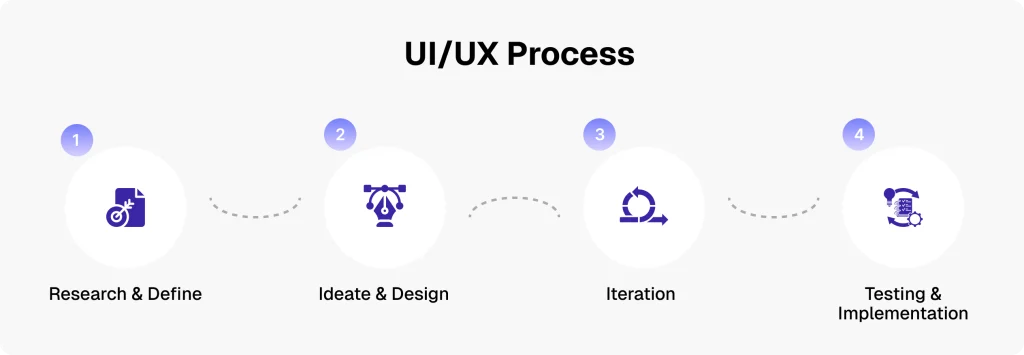
Many teams use the Double Diamond as a framework for structuring design work. Developed by the Design Council, it describes four broad phases: Discover, Define, Develop, and Deliver. The process is not strictly linear. Teams can return to earlier stages as new information emerges.
In practice, a software UI/UX project can break down into the following steps:
1. User Research
The team learns about users, their needs, behaviors, pain points, and expectations through methods such as interviews, surveys, competitor analysis, analytics, and existing customer feedback.
2. Define
Research findings are turned into clear problem statements, user personas, user stories, and project goals.
3. Information Architecture and User Flows
The team determines how information should be organized and how users move through the product.
This can include sitemaps, navigation structures, card sorting, task flows, and user journeys.
4. Wireframing
Low-fidelity wireframes establish the structure of screens before visual styling is introduced.
The goal is to answer questions such as:
- What information appears first?
- Where should the primary action sit?
- How should users move from one step to another?
- What information can be removed or simplified?
5. Visual Design
Once the structure is established, designers develop the visual interface. This includes typography, colors, spacing, components, icons, imagery, and design systems.
6. Prototyping
Clickable prototypes, commonly created in Figma, allow stakeholders and users to experience important flows before development begins.
7. Usability Testing
Real or representative users are asked to complete realistic tasks while the team observes where they succeed, hesitate, become confused, or make mistakes.
The purpose is not simply to ask whether users “like” the design. It is to identify problems that can be fixed before development or launch.
8. Handoff and Iteration
Design specifications, assets, components, and interaction details are shared with developers. Once development begins, designers and developers work together to ensure the implemented product matches the intended experience.
After launch, analytics, user feedback, support requests, and usability findings can inform further improvements.
How Prodzyn Approaches UI/UX Projects
At Prodzyn, the exact process depends on the project’s scope, but the goal is consistent: understand the business problem, understand the users, create a clear structure, and then turn that structure into an interface that is practical to build and use.
A typical project may involve:
Discovery and research: Understanding the business, users, competitors, existing product, and project goals.
UX strategy: Mapping user journeys, information architecture, navigation, and important task flows.
Wireframes: Establishing the structure and functionality of key screens before investing heavily in visual design.
UI design: Creating the visual system, components, layouts, typography, and interaction patterns.
Prototype: Connecting screens into realistic flows so stakeholders can review the experience before development.
Developer handoff: Providing the design files, specifications, components, and assets needed for implementation.
Iteration: Refining the experience based on stakeholder feedback, testing, development constraints, and post-launch data.
This approach helps prevent a common problem in software projects: spending significant time developing screens that later need to be redesigned because the underlying user flow was never properly considered.
Core UI/UX Design Principles
Good software design rests on a set of well-established principles.
Nielsen’s 10 Usability Heuristics
Jakob Nielsen’s usability heuristics remain a widely used framework for evaluating interfaces. Four particularly practical principles include:
- Visibility of system status: Always show users what is happening, such as loading indicators, progress states, and confirmations.
- Consistency and standards: Similar things should look and work in similar ways.
- Error prevention: Design interfaces so common mistakes are difficult to make.
- Recognition rather than recall: Let users see available options instead of forcing them to remember information.
Laws of UX
Several commonly referenced UX principles provide useful rules of thumb:
- Hick’s Law: The more choices users have, the longer decision-making can take.
- Fitts’s Law: The time required to reach a target depends partly on its size and distance, which is why important interactive elements should be easy to reach.
- Jakob’s Law: Users tend to expect a product to work in ways similar to products they already know.
These principles should guide design decisions, not replace research or testing.
Visual Hierarchy
Size, contrast, spacing, positioning, and typography help guide attention. A strong visual hierarchy makes it clear what users should notice first, what they should do next, and which information is secondary.
Accessibility
Accessibility should be considered throughout the design process rather than added at the end.
WCAG 2.2 provides internationally recognized accessibility guidance organized around four principles: content should be perceivable, operable, understandable, and robust.
For businesses operating in markets covered by accessibility legislation, accessibility can also have legal implications. The European Accessibility Act began applying on June 28, 2025, to covered products and services in the EU.
Platform Guidelines
Apple’s Human Interface Guidelines and Google’s Material Design provide established patterns for designing interfaces that feel familiar on their respective platforms.
Following platform conventions does not mean every product should look identical. It means users should not have to relearn basic interactions unnecessarily.
Common UI/UX Mistakes in Software
Most poor software experiences trace back to a short list of avoidable mistakes:
- Skipping user research and designing from assumptions.
- Overloading screens with too many features and options.
- Using inconsistent components and patterns across pages.
- Ignoring mobile and different screen sizes.
- Treating accessibility as an afterthought instead of a requirement.
- Giving poor error messages or no feedback, such as missing loading and confirmation states.
- Launching without testing with real users.
- Designing individual screens without considering the complete user journey.
- Prioritizing visual polish before solving structural usability problems.
Each of these problems is generally cheaper to address during design than after development.
UI/UX Trends to Watch in 2027
Software design continues to change as technology and user expectations evolve. Some of the areas worth watching include:
Predictive and Hyper-Personalized UX
Interfaces can increasingly adapt to user behavior, preferences, context, and previous actions. Instead of presenting exactly the same experience to everyone, products can anticipate likely needs and surface relevant information at the right moment.
Cognitive-Inclusive and Ethical Design
Accessibility is expanding beyond basic technical requirements. Designers are paying more attention to cognitive load, readability, clarity, decision-making, and the different ways people process information.
Conversational Interfaces
Chat and voice interactions are becoming part of digital products alongside traditional screens. The challenge is not simply adding a chatbot, but deciding where conversational interaction genuinely makes a task easier.
Agentic Experiences
As AI systems become capable of navigating interfaces and completing tasks on behalf of users, designers may need to consider two audiences: humans interacting with the product directly and AI agents interacting with it to complete tasks.
Trust Over Polish
AI tools can now generate polished interfaces quickly. As visual production becomes easier, design value increasingly shifts toward understanding users, solving the right problem, making good product decisions, and creating experiences users can trust.
Not every emerging trend belongs in every product. Businesses should adopt new interaction patterns when they solve a real user problem rather than adding technology simply because it is available.
How to Measure Good UI/UX
Good design should be measurable, not just a matter of opinion.
Usability Metrics
Useful measures include:
- Task success rate
- Time on task
- Error rate
- Task abandonment
- Navigation efficiency
- Completion rate
SUS
The System Usability Scale, or SUS, is a 10-question questionnaire that provides a standardized way to assess perceived usability and compare results over time.
Business Metrics
Depending on the product, UI/UX improvements can be connected to:
- Conversion rate
- Activation rate
- Retention
- Churn
- Average order value
- Feature adoption
- Support tickets
- Onboarding completion
Behavioral Tools
Heatmaps, session recordings, analytics, surveys, usability testing, and A/B testing can provide evidence of how people actually interact with a product.
The important point is that UI/UX should not be judged only by whether a stakeholder likes a screen. A design can look impressive and still fail if users cannot complete the task it was designed for.
Frequently Asked Questions
What does UI/UX stand for?
UI stands for User Interface, while UX stands for User Experience.
UI focuses on the interface users see and interact with, including layouts, buttons, typography, colors, icons, and visual components. UX covers the broader experience, including research, navigation, information architecture, task flows, usability, accessibility, and how easily users can accomplish their goals.
What is the difference between UI and UX?
UI is primarily concerned with the interface and its visual and interactive design. UX focuses on the complete experience of using the product.
For example, choosing a button’s color and typography is a UI decision. Deciding where that button should appear, what happens when users click it, and whether the overall process helps them complete their goal are UX considerations.
Do I need both a UI designer and a UX designer?
Not necessarily.
On larger projects, UI and UX may be handled by different specialists. On smaller projects, one designer may handle both disciplines.
What matters is that both sides of the problem are addressed. A visually polished interface is not enough if the underlying user journey is confusing, and a well-planned user journey still needs a clear, usable interface.
Is UI/UX the same as front-end development?
No.
UI/UX design determines how a product should look, behave, and guide users through tasks. Front-end development turns those designs into a working interface using code.
Designers and developers need to collaborate closely because technical constraints can affect the final experience.
How long does a UI/UX design project take?
There is no single timeline.
A simple landing page may take days, while a SaaS platform, mobile application, CRM, ERP system, or e-commerce platform can require several weeks or months.
The timeline depends on factors such as the number of screens, complexity of user flows, research requirements, number of user roles, feedback cycles, integrations, and whether the project involves redesigning an existing product or creating something from scratch.
Conclusion
UI is how software looks and responds. UX is how the whole experience works and feels.
Understanding what UI/UX in software means helps businesses make better decisions when building a product, redesigning an existing system, or choosing a design team.
The strongest software experiences are not created by making screens look attractive alone. They come from understanding users, organizing information clearly, reducing unnecessary friction, testing important interactions, and continuously improving the product based on evidence.
When UI and UX work together, software becomes easier to understand, easier to use, and easier for businesses to improve over time.